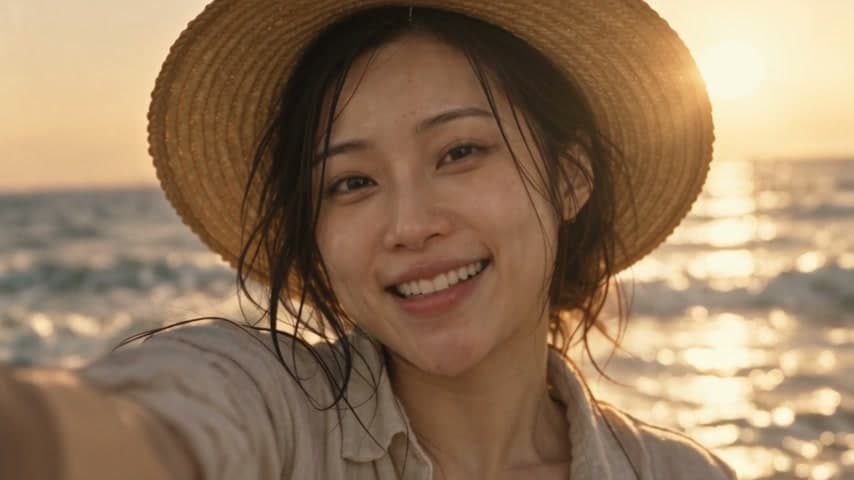
Establishing wide
Cinematic 16:9 establishing shot of a small coastal town at blue hour, the lead character tiny in frame walking along the harbour wall, 24mm lens, deep focus, lamp posts just switching on, muted teal and amber grade, no text.
Write one story brief and get a four-shot storyboard with your character in every frame, then turn each frame into a five-second clip with sound. Sketch a single frame free below on our own open image model, no account needed; the full template draws frames with GPT Image 2.5.
Free previews run on our own open image model, no sign-up needed. Daily limit per visitor; prompts are safety-checked. Sign up to use GPT Image 2.5, Nano Banana, Seedance 2.5 and every other model on credits.
How It Works
One paragraph: who the character is, where they are, what happens and how it ends. Add the setting, wardrobe and tone so every shot agrees.
A director model writes an establishing, action, close-up and resolution shot, and GPT Image 2.5 draws each one in 16:9 with your saved character as the reference.
Seedance 2.5 Turbo turns each frame into a five-second 720p clip with ambient sound, ready to cut together in order.
Storyboard to video AI
The template draws each shot as a 16:9 frame with your character, then hands the frame to Seedance 2.5 as the first image of the clip, so the video starts exactly where the storyboard left off.

What one run costs
Every run writes 4 shots, draws 4 frames and renders 4 clips. Each shot-writing step costs 1,000 credits; the generation steps are quoted below at the template's default settings.
| Step | Default settings | Typical time | Credits per step |
|---|---|---|---|
| 4 × GPT Image 2.5 Flare | 16:9, 1K, medium quality | ~20s | 1,204 |
| 4 × Seedance 2.5 Turbo | 16:9, 5 s, 720p, audio | ~45s | 50,126 |
| Full run | 4 shots, frames and clips | A few minutes | 209,320 |
Credits are calculated from the live model pricing when this page is built. Changing a node's model, resolution or duration changes its quote, and the canvas shows the cost again before anything runs.
Storyboard prompts
Each prompt names the framing, lens, light and one clear action, which is what a video model needs to animate a frame convincingly. Paste one into the free preview above and swap in your own character and setting.
Cinematic 16:9 establishing shot of a small coastal town at blue hour, the lead character tiny in frame walking along the harbour wall, 24mm lens, deep focus, lamp posts just switching on, muted teal and amber grade, no text.
Waist-up medium shot of a woman in a yellow raincoat pulling a bicycle out of a flooded alley, mid-motion, water splashing at her boots, 35mm lens, overcast soft light, fine film grain.
Tight close-up of a man's face and hands as he reads a handwritten letter at a kitchen table, one tear forming, 85mm lens, window light from the left, shallow depth of field, quiet and still.
Static wide frame of the same woman sitting on a rooftop at sunset after the storm, city steaming below, relaxed posture, composition that can hold for five seconds, warm golden grade.
Over-the-shoulder shot from behind a detective looking at a wall of photos pinned with red string, only his silhouette and collar in focus, practical desk lamp, 50mm, noir contrast.
Medium close-up of hands opening a matte black watch box on a walnut desk, morning light raking across the lid, the watch face catching a highlight, 50mm, clean commercial look, no logos.
Low-angle shot of a young climber reaching the summit ridge, arms lifting, wind in her jacket, sun flaring behind her, 24mm, dramatic sky, cinematic contrast.
Two-shot of two friends on a night train facing each other across a small table, city lights streaking past the window, one laughing mid-sentence, 35mm, warm interior practicals.
Features
Establishing, action, close-up and resolution shots are written from your brief, so the sequence reads like a scene instead of four unrelated images.
Pick a saved AI influencer and every frame uses it as the reference, with the prompt locking face, hair, skin tone and build.
OpenAI GPT Image 2.5 Flare renders 16:9 cinematic frames at 1K: 35mm look, motivated light, film grain and no stray text or logos.
ByteDance Seedance 2.5 Turbo animates each frame with one camera move and scene-matched ambient sound, keeping wardrobe and set intact.
Every step is a node on the AI Canvas. Rewrite one shot, change a frame's model or re-render a single clip without touching the rest.
Each node shows its credit cost before it runs, and the template draws from the same balance as the rest of the studio.
Storyboards for creators, agencies and filmmakers
Use it to pitch an idea before a shoot, to plan a short film or ad, or to go straight from brief to a four-clip sequence. The same character carries through every frame and every clip.
Show a client four finished frames and moving shots instead of stick figures and a script.
A saved AI influencer keeps the same face across every frame and clip.
The template starts wired: brief, character, shots, frames and clips are already connected.
Practical workflow
The free preview above runs our own open image model. Use it to find the framing and lens before the template renders frames with GPT Image 2.5.
In the AI Canvas, open Storyboard to Film from the Filmmaker templates.
Write one paragraph and select a saved AI influencer as the lead.
Check the four frames, re-run any shot you do not like, then render the clips.
AI frames and clips vary between runs. Review identity, hands and continuity before you publish, and only use likenesses you have the rights to.




Trusted by over 300,000+ creators
Testimonials
Tried this on a whim last week and honestly can't stop using it. Made my first AI influencer for Instagram — the photos look scarily real. The lip sync feature is insane for reels, getting me way more engagement than I expected.
“Was messing around with Stable Diffusion for months trying to get consistent faces. This does it in like 2 clicks. The image quality is seriously good for what you pay.”

“Created a fitness influencer and the motion control feature is what hooked me. She can actually do workout demos and it looks real. My TikTok blew up with the exercise videos.”
“I've tried a bunch of AI image tools as a developer. The character consistency here is genuinely impressive — same face across every clip without me having to fiddle. Using it for a tech review character on YouTube Shorts and it works way better than expected.”
“Started with one character just for fun, now I'm running three different ones. Each has their own look and personality. The video models keep getting better with every update too.”
FAQ
Open the AI Canvas, load Storyboard to Film from the Filmmaker templates, pick your character and run it.
Start creating in minutes · Pay as you go