YouTube automation used to mean hiring a team. A scriptwriter, a voiceover artist, a stock-footage editor, and a thumbnail designer — four freelancers turning one idea into one video, then doing it again tomorrow. The model worked, but it cost $300 to $600 per video and only made sense once a channel was already earning.
In 2026, AI collapsed that entire team into a single workflow. You give a tool a topic, and it returns a finished short: script, voiceover, visuals, music, and captions, edited together and ready to upload. That shift is what people now mean when they say "YouTube automation," and it is why thousands of new faceless channels launch every month.

This guide explains what YouTube automation actually is, how the AI version works step by step, which tool to use, and how creators turn a faceless channel into a real business. No fluff, no "passive income" fantasy — just the workflow that works right now.
Updated May 2026 with current AI tooling, CPM data, and monetization rules.
What Is YouTube Automation?
YouTube automation is the practice of running a YouTube channel without personally producing every part of each video. The creator acts as a director and operator — choosing niches, approving topics, and uploading — while the production work (scripting, narration, footage, editing) is handled by other people or, increasingly, by AI.
The term covers two very different models that often get confused:
- Outsourced automation — You hire freelancers or an agency to make videos for you. You manage the channel; they do the labor. This is the original meaning and still common for larger channels.
- AI automation — A single tool produces the entire video from a prompt. No team, no per-video freelancer cost. This is what makes automation accessible to someone starting with $29, not $3,000.
Almost every YouTube automation channel is also a faceless channel — the creator never appears on camera. That is not a coincidence. Removing the on-camera host is exactly what makes the rest of the pipeline automatable, because a script and a voiceover can be generated, but a human presenter cannot.
YouTube automation vs faceless channel
A faceless channel describes the format (no creator on screen). YouTube automation describes the operating model (you don't do the production yourself). Nearly all automation channels are faceless, but you can run a faceless channel manually too. This guide focuses on the AI-automated, faceless approach — the fastest and cheapest way to start in 2026.
Why AI Changed YouTube Automation in 2026
The old automation model had a hard floor: every video cost real money before it earned a cent. You needed savings or an existing channel to fund the team. AI removed that floor.
Here is what each production step used to cost versus what it costs now:
| Production step | Outsourced (per video) | AI automation (per video) |
|---|---|---|
| Script writing | $30 – $80 | Included |
| Voiceover | $20 – $60 | Included |
| Visuals / B-roll | $40 – $150 | Included |
| Editing & captions | $50 – $200 | Included |
| Thumbnail | $10 – $40 | Included |
| Total | $150 – $530 | ~$0.30 – $2 in credits |
When a finished video drops from several hundred dollars to a couple of dollars in compute, the math of the whole business changes. You can test ten niches instead of betting everything on one. You can post daily from day one instead of rationing uploads. And you reach the monetization threshold faster because volume and consistency — the two things the algorithm rewards most — are no longer gated by budget.
Why AI Automation Wins
How AI YouTube Automation Works: The 5-Step Workflow
Every AI automation tool follows the same underlying pipeline. Understanding it helps you spot which tools actually finish the job versus which ones leave you stitching pieces together manually.
Pick a Niche and Format
Choose a topic area (stoicism, history, money, science) and a format (talking character, b-roll explainer, AI clips, or gameplay-loop facts). The niche sets your CPM ceiling; the format sets your production style.
Generate the Script
An AI writes a retention-optimized script from your topic — hook in the first three seconds, value in the middle, payoff at the end. This is the single biggest lever on watch time.
Produce Voiceover and Visuals
The script is turned into a natural voiceover, then matched to AI-generated visuals, B-roll, or a talking character. Music is auto-selected to fit the mood.
Edit, Caption, and Render
Scenes are assembled, captions are burned in and synced, and the video is rendered in HD. Good captions alone can lift watch time on muted scrolls by a third.
Download, Upload, Repeat
Export the finished video, upload to YouTube (and cross-post to TikTok and Reels), then repeat daily. Double down on whatever hits.
The tools that struggle are the ones that stop at step two or three — handing you a script and some clips and leaving the edit to you. That is not automation; that is a slightly faster manual workflow. True automation completes all five steps and hands you a file you can upload.
Choosing Your YouTube Automation Tool
The tool you pick determines whether "automation" actually means automation. The questions that matter:
- Does it produce a finished, edited video, or just raw pieces?
- Can it make long-form (8+ minutes), or only short clips? Long-form is where mid-roll ad revenue lives.
- Are the voices lifelike enough that viewers don't swipe in three seconds?
- Is the music licensed so you don't get demonetized or copyright-struck?
- Can you regenerate a single scene without remaking the whole video?
The tool built for this exact workflow
A purpose-built faceless-video automation tool is what makes this workflow real: you drop in one topic and it writes the script, generates the voiceover, creates the visuals, adds mood-matched licensed music, and burns in captions — returning a finished short or long-form video you can upload straight away. Purpose-built automation services handle this topic-to-finished-video workflow, including shorts and long-form output, while generic clip generators still leave the assembly work to you. Pick a tool that finishes the whole pipeline, not one that stops at clips.
Where MakeInfluencer.ai fits. It plays a different role from a hands-off automation tool. MakeInfluencer.ai is the studio — built for creators who craft a polished AI character and produce clips with full control over lip sync, motion, model choice, and character consistency. End-to-end automation is better suited to topic-to-finished-video production at the volume a faceless channel needs.
If you want a recognizable on-brand persona, design a consistent AI influencer or character in MakeInfluencer.ai first, then carry that look into your automation pipeline. Studio-grade character, automated output. See our how to create an AI influencer guide for the character side.
The Best Niches for an Automated Faceless Channel
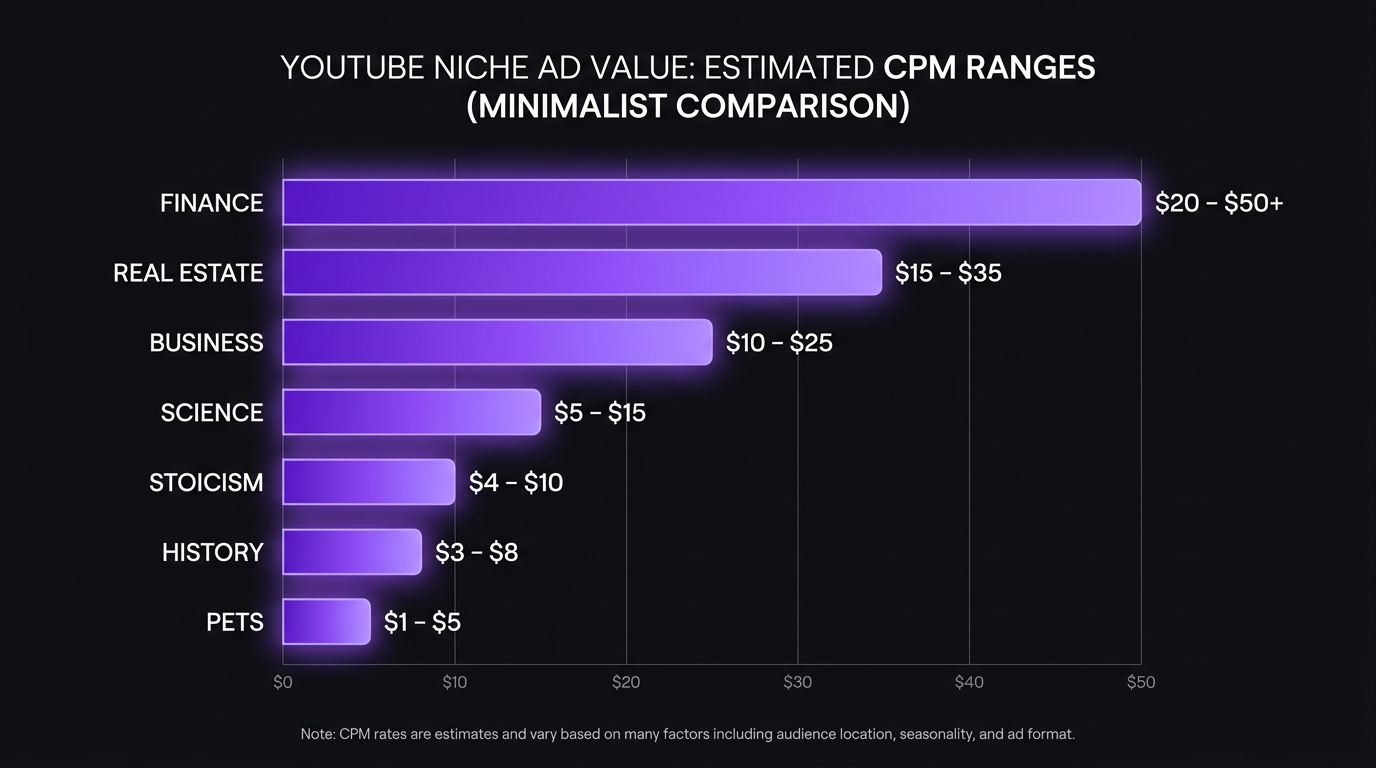
Niche selection is the highest-leverage decision you make, because it sets both your CPM (how much advertisers pay per thousand views) and how easily content can be automated. The sweet spot is a niche with strong CPM and content that does not need a human presenter.
| Niche | Avg CPM | Why it automates well |
|---|---|---|
| Finance & investing | $15 – $40 | Concept explainers over data visuals; no presenter needed |
| Stoicism & philosophy | $6 – $14 | Narrated wisdom over cinematic B-roll |
| History & "did you know" | $4 – $12 | Narration over period imagery and maps |
| Science & space | $6 – $15 | Voiceover over generated visuals of concepts |
| Money & side hustles | $10 – $25 | List-style scripts, high search demand |
| Self-improvement | $8 – $15 | Evergreen, endless topics, strong retention |
| Pets & animals | $3 – $8 | Massive reach, lower CPM, huge view volume |
For a deeper breakdown with example channels, subscriber counts, and earnings ranges per niche, see our 21 faceless YouTube channel ideas guide. And for the format and growth mechanics specific to faceless channels, the complete faceless YouTube channel guide goes step by step.
How to Start a YouTube Automation Channel: Step by Step
Here is the practical sequence to go from zero to your first uploads.
1. Validate the Niche Before You Commit
Spend an evening on YouTube searching your candidate niches. You want to see channels that are clearly faceless, posting consistently, and getting views in the hundreds of thousands. That is proof of demand. If a niche is a graveyard of abandoned channels, the format does not work there — move on.
2. Set Up the Channel Properly
- Pick a brandable channel name (not your personal name) so the channel could later be sold or expanded.
- Design a clean banner and logo that signal the niche instantly.
- Write a keyword-rich channel description so YouTube understands your topic.
3. Build a Content Backlog
Do not upload one video and wait. Use your automation tool to generate 10 to 15 videos before you launch, so you can post on a fixed schedule without scrambling. Consistency is a ranking signal; gaps hurt you.
4. Optimize Every Upload for Search and Click
- Title: front-load the primary keyword, add a curiosity gap.
- Thumbnail: one bold idea, 3–5 words of text, high contrast.
- Description: 200+ words with natural keywords.
- Chapters and tags: improve watch time and discoverability.
5. Read the Data and Double Down
After 20 to 30 uploads you will have a clear signal. Some topics and thumbnails will outperform by 5–10x. Make more of those. The fastest growth comes from ruthlessly repeating what already hit, not from constant reinvention.
The revenue math that makes this worth it
A long-form video in the finance niche with 50,000 views at a $20 CPM earns about $1,000 from a single upload. Three of those a week is $12,000/month in AdSense alone — before affiliates or sponsorships. The whole point of automation is to make that volume reachable for one person. See our full monetization breakdown for earnings by niche and platform.
Shorts vs Long-Form: Why You Need Both
The most common mistake in YouTube automation is making only short clips. Shorts are excellent for discovery and rapid subscriber growth, but their RPM is low ($0.04–$0.08 per thousand views). The real ad money lives in 8–15 minute long-form videos that run mid-roll ads.
The winning structure is a funnel:
- Post Shorts daily to reach non-subscribers through the Shorts shelf.
- End every Short with a hook to your long-form content.
- Shorts convert viewers into subscribers far faster than long-form alone.
- Subscribers get notified about long-form uploads, where the CPM is 50–100x higher.
This is exactly why your automation tool needs to produce both formats. A tool that only makes shorts caps your income at the lowest RPM tier. The strongest faceless automation tools unlock long-form up to 20 minutes specifically so you can run this funnel without a second tool.
Turning a Faceless Channel Into a Business
This is what people mean by "YouTube automation business" — not one channel, but a portfolio operated like an asset.
Once a single channel is profitable and the workflow is dialed in, the model scales horizontally:
- Multiple channels, multiple niches. Each automated channel is an independent revenue stream. Operators commonly run 3–14 channels once their pipeline is repeatable.
- One operator, not one team. Because AI handles production, scaling channels does not mean scaling headcount. The marginal cost of a second channel is mostly your time approving topics.
- Sellable assets. A monetized, consistently-uploading faceless channel is a saleable business that trades for 20–40x monthly profit on marketplaces.
The constraint shifts from "can I afford to make videos" to "which niches deserve another channel." That is a much better problem to have, and it is only reachable because the per-video cost is near zero.
Is YouTube Automation Allowed? The Honest Answer
Yes — with an important nuance. YouTube does not ban faceless or AI-assisted content. What its policies target is low-effort, mass-produced content with no human curation or value (the "inauthentic content" rule updated in 2025).
The line is curation and quality. A channel where a human chooses the niche, directs the topics, reviews the script, and ensures each video genuinely informs or entertains passes review like any other faceless channel. A channel that auto-publishes hundreds of identical, valueless videos with no oversight is what gets demonetized.
In practice, this means:
- Stay in your lane on quality. Lifelike voices, coherent scripts, real value. Robotic narration and empty fact-dumps are what get flagged.
- Disclose AI use where YouTube requires it (the "altered or synthetic content" toggle for realistic AI footage).
- Don't spam. Daily, curated uploads are fine. Hundreds of auto-generated videos a day are not.
Mistakes that kill automation channels
- Only short clips — no watch time, no real ad revenue. Add long-form. - Robotic voices — viewers swipe in three seconds. Use lifelike, tone-matched voices. - Generic stock-y assets — get your channel flagged. Use a copyright-safe pipeline. - Empty fact dumps — no retention past 30 seconds. Write narrative-first scripts. - Inconsistent uploading — gaps reset your momentum. Build a backlog and post on schedule.
These are exactly the failure modes a dedicated faceless automation tool is built to avoid — lifelike voices, narrative-first scripts engineered for retention, licensed music, and long-form support — which is why a purpose-built tool beats the generic clip-makers every time.
YouTube Automation Tools Compared
Not all automation tools finish the job. Many stop at clips and leave the editing — or only do short-form. Here is how the category breaks down and where a dedicated faceless tool wins.
A Realistic 90-Day Timeline
The biggest reason people quit YouTube automation is a broken expectation of speed. Channels do not explode in week one. Here is what a realistic, well-run automated faceless channel looks like over its first 90 days, so you know whether you are on track or actually behind.
Days 1–14: Setup and Backlog
You are not uploading yet. You are validating the niche, setting up the channel, and generating a backlog of 10–15 videos. This front-loading is what lets you post consistently later instead of scrambling. By day 14 you should have a branded channel and two weeks of content queued.
- Views: 0 — you have not posted.
- Action: Validate niche, design channel art, generate backlog, write 20 title ideas.
Days 15–45: Posting and Learning
Now you upload daily. Early views will be low and inconsistent — a few hundred per video is normal. This is the data-gathering phase. You are not looking for a hit yet; you are looking for signals: which topics get higher click-through rate, which thumbnails work, where retention drops.
- Views: A few hundred to low thousands per video, with occasional spikes.
- Action: Post daily, log which videos overperform, refine titles and thumbnails weekly.
Days 46–75: First Traction
Somewhere in this window, most well-run channels get their first "breakout" — a video that does 10x your average. The algorithm has gathered enough data to start showing your content to the right viewers. Make more of whatever broke out. This is also when subscriber growth becomes visible.
- Views: First videos crossing 10K+; subscribers climbing from dozens to hundreds.
- Action: Double down on the breakout format, keep posting, add your first long-form videos.
Days 76–90: Approaching Monetization
By day 90, a consistent channel in a viable niche is climbing toward the 1,000 subscribers and 4,000 watch-hours monetization threshold. Some reach it; many are close. The long-form videos you started in the previous phase are doing the heavy lifting on watch hours.
- Views: Steady thousands per video; a few breakouts; watch hours accumulating.
- Action: Apply for the YouTube Partner Program when eligible, keep the Shorts-to-long-form funnel running.
If you're behind this timeline
The two most common causes of a stalled channel are (1) inconsistent posting — gaps reset your momentum — and (2) a weak hook in the first three seconds. Before blaming the niche, check your posting calendar and watch your retention graphs. Fix those two things and most "dead" channels start moving.
Titles and Thumbnails: The Two Clicks That Matter Most
No matter how good your automated video is, nobody watches it if they do not click. On YouTube, the title and thumbnail are the entire pitch. For faceless channels this is doubly true, because you cannot rely on a recognizable creator face to earn the click.
Writing Titles That Get Clicked
- Front-load the keyword. "Stoicism: 5 Rules for a Calm Mind" beats "5 Rules I Learned About Staying Calm" because the searchable term comes first.
- Add a curiosity gap. Promise a payoff without giving it away: "The Habit That Quietly Makes People Wealthy."
- Use specificity. Numbers and concrete claims ("$1,000 from one video") outperform vague ones ("make money online").
- Keep it under ~60 characters so it does not truncate in search and suggested feeds.
Thumbnails for Faceless Channels
Since you have no face to feature, your thumbnail leans on one bold visual idea plus minimal text:
- One subject, one idea. A cluttered thumbnail loses at small sizes. Pick a single striking image.
- 3–5 words of text, maximum. High contrast — light text on dark, or the reverse.
- Consistent style. A recognizable thumbnail style trains returning viewers to spot your videos in a crowded feed.
- Test in miniature. Shrink your thumbnail to the size it appears on mobile. If you cannot read it or grasp it instantly, simplify.
A practical loop: generate 3–5 title and thumbnail variations for each video, publish your best guess, and study which patterns earn the highest click-through rate over your first 20–30 uploads. Then standardize on what wins.
Your Automation Tech Stack
"YouTube automation" is mostly one tool — the video generator — plus a few supporting pieces. Here is the full stack and where each part fits, so you are not over-buying software.
| Layer | Purpose | What you need |
|---|---|---|
| Video production | Topic → finished video | A dedicated faceless automation tool — this is the core |
| Topic research | Finding what to make | YouTube search, Google Trends, your competitors' best videos |
| Channel management | Uploading, scheduling | YouTube Studio (free) — schedule uploads in advance |
| SEO & analytics | Optimizing discovery | YouTube Studio analytics; optional tools like TubeBuddy or vidIQ |
| Character (optional) | A recognizable persona | MakeInfluencer.ai to design a consistent AI character or avatar |
The mistake beginners make is buying a pile of tools before posting a single video. You do not need them. Start with one video generator and YouTube Studio. Add analytics tools only once you have enough uploads for the data to matter.
Common Myths About YouTube Automation
A lot of bad information surrounds this topic, much of it sold by "course gurus." Here is what is actually true.
- Myth: "It's passive income — set it and forget it." No. Automation removes the production labor, not the direction. You still pick niches, approve topics, study analytics, and decide what to scale. It is a business you operate, not a machine that prints money while you sleep.
- Myth: "YouTube will ban AI/faceless channels." False. YouTube bans low-effort, valueless spam — not curated faceless content. Thousands of faceless channels are monetized and growing. Quality and curation are the line, not the format.
- Myth: "It's too late, the niche is saturated." Saturation means demand, and demand is good — it proves people watch this content. New channels break through in "saturated" niches constantly by having sharper hooks and better consistency.
- Myth: "You need thousands of dollars to start." That was true in the freelancer era. With AI automation, the production cost is a couple of dollars in credits per video. The real investment is consistency over months.
- Myth: "More uploads always equals more growth." Volume helps only if quality holds. Ten strong videos beat fifty weak ones — weak content trains the algorithm to stop showing your channel.
The honest version: YouTube automation is a real, repeatable business with low production cost and a slow ramp. The people who win treat it like operating a media company, not buying a lottery ticket.
Frequently Asked Questions
What is YouTube automation in simple terms?
It is running a YouTube channel without doing the production yourself. Instead of filming and editing, you direct the channel — picking niches and topics — while AI (or hired freelancers) creates the actual videos. Most automation channels are faceless, meaning no one appears on camera.
How do I start YouTube automation with no money?
Start with an AI automation tool rather than hiring freelancers, since AI drops the per-video cost to a couple of dollars in credits. Most dedicated faceless automation tools start around $29/month, which is enough to produce a daily upload schedule. Pick one validated niche, build a backlog of 10–15 videos, and post consistently.
Is YouTube automation profitable?
Yes, but not instantly. Most channels take 3–6 months to gain traction and reach the 1,000 subscribers and 4,000 watch hours needed for monetization. Once monetized, high-CPM niches like finance can earn $4,000–$40,000/month at scale. The profitability comes from low production cost plus consistent volume.
Does YouTube allow AI-generated automation videos?
Yes. YouTube allows AI-assisted and faceless content as long as it provides genuine value and you curate it. Its policy targets mass-produced, valueless spam — not curated channels. Disclose realistic synthetic content where required.
How many videos should I upload per week?
For a new automated channel, aim for one Short per day plus 2–3 long-form videos per week. Shorts drive subscriber growth; long-form drives ad revenue. Automation makes this cadence achievable for a single operator.
Can I run multiple automation channels at once?
Yes — this is how operators scale to a real business. Because AI handles production, adding a channel does not require adding staff. Many run 3–14 channels across different niches once their workflow is repeatable.
What is the best tool for YouTube automation?
Look for a dedicated faceless automation tool that returns a finished, uploadable video end to end — including long-form and lifelike voices. Generic tools that only produce clips leave you editing manually, which defeats the point of automation.
Will I get a "reused content" strike for AI videos?
Reused-content issues come from re-uploading other people's footage with little change, not from AI generation. Because automated tools generate original scripts, voiceovers, and visuals, the output is original to your channel. Avoid copy-pasting the same script across multiple channels, and favor original AI visuals over recycled stock to stay clear of any duplication flags.
Can I make automated videos in other languages?
Yes. Modern automation tools offer lifelike voices in multiple languages — English, Spanish, Hindi, Japanese, and more — so you can run a faceless channel targeting any major audience. Non-English niches often have less competition and strong CPMs in markets like Germany and Scandinavia.
Do I need a business or LLC to start?
No. You can start and monetize a faceless channel as an individual. Many operators form an LLC later, once the channel is profitable or they are running several, mostly for tax and liability reasons. It is not a prerequisite to begin.
How is this different from just using ChatGPT and a video editor?
ChatGPT writes a script, but you still have to generate a voiceover, source or create visuals, add music, edit, and caption — hours of manual work per video. A dedicated automation tool does all of those steps in one pass and hands you a finished file. The difference is the assembled, edited output, not just the script.
Can I sell a faceless channel later?
Yes. A monetized faceless channel with consistent uploads is a saleable asset. Established channels trade on marketplaces for roughly 20–40x their monthly profit, which is part of why operators treat automated channels as a portfolio rather than a hobby.
How long should my automated videos be?
Make both. Shorts (under 60 seconds) drive discovery and subscriber growth, while long-form in the 8–15 minute range is what unlocks mid-roll ads and the highest CPMs. A tool that produces both lets you run the funnel — shorts to find viewers, long-form to monetize them — without juggling separate apps.
Start Your Automated Faceless Channel
YouTube automation in 2026 is no longer a budget game. The production cost is gone, the tooling is mature, and a single person can run what used to require a four-person team. The only real inputs left are niche selection, consistency, and a tool that actually finishes the video.
Pick a niche with strong CPM, build a backlog, and upload daily. Let the data tell you what to repeat.
Choose a dedicated faceless automation tool that finishes the whole video — one topic in, a finished short out, in about five minutes — and you have everything you need to start.
For the format and growth deep-dive, read the complete faceless YouTube channel guide. For niche ideas with earnings ranges, see 21 faceless YouTube channel ideas.