AI roleplay works best with a clear starting problem, defined character controls and a short record of events. You do not need a page of personality adjectives. You need something the characters can respond to. In AI chatbot roleplay, those choices turn a stream of messages into a scene you can help shape.
This guide uses fictional adult characters and non-explicit scenes. The prompts are starting templates you can adapt; individual apps may interpret them differently.

A character, a place and an unresolved problem give a conversation somewhere to begin.
What is AI chatbot roleplay?
AI chatbot roleplay is a conversation in which you and an AI write within a fictional situation. You might play a passenger questioning a suspicious conductor, while the chatbot plays the conductor. Alternatively, you can ask the AI to narrate the station and its supporting characters while you control one protagonist.
Decide between those arrangements before starting. Otherwise, the chatbot may narrate your choices when you expected it to speak only for its character.
Roleplay can also mean an ongoing companion conversation. If that is your priority, the Character AI alternatives guide covers how to compare that category. For objectives and branching scenes, see the AI girlfriend game guide.
Choose a format before choosing an app
| Format | Your main activity | What to check |
|---|---|---|
| Character chat | Exchange dialogue with one character | Character instructions and reply controls |
| Story adventure | Explore a setting and decide what happens next | Narration, scene editing and saved story context |
| Companion conversation | Return to an ongoing fictional relationship | Conversation controls and ways to review context |
Character.AI presents an AI chat experience. AI Dungeon describes itself as an AI text adventure game. These are useful starting points for comparing conversation and adventure formats, but those descriptions do not establish which handles your particular scene better.
MyWifu is another option to inspect for adult companion chat: its public interface includes a character directory and a creation flow offering appearance, personality and voice choices, with an 18+ notice. Its plans page describes token-based chat, calls, custom photos and videos.
Build a character who has something to do
A useful character brief contains a role, an immediate goal, a constraint and a recognizable speaking habit. Give the character something to withhold, misunderstand or investigate. That creates movement without requiring constant plot twists.
Compare “Be a mysterious, clever, interesting character” with “Play a lighthouse keeper who recognizes a damaged map but does not want to explain where she saw it.” The first prompt gives adjectives; the second creates a specific tension you can explore through dialogue. Add only the background that affects the present scene. A long biography about childhood, favorite foods and distant relatives can wait until those details become relevant.
Try this opening:
Play Mara, a fictional 32-year-old lighthouse keeper.
I play Eli, a fictional 30-year-old cartographer.
Tonight the lighthouse signal has repeated an unfamiliar pattern.
Mara wants to find its source before the supply boat arrives.
She is practical, speaks in short sentences and dislikes guessing.
She knows the tower but has never decoded this signal.
Write Mara's dialogue and observable actions only.
Do not decide Eli's actions, thoughts, feelings or replies.
Keep each turn under 120 words. End with room for my response.
Begin as I arrive carrying a damaged coastal map.
The knowledge limit matters: Mara cannot solve the mystery immediately through information she was never given. The turn limit leaves space for interaction. Neither instruction guarantees compliance, so treat the first few replies as a calibration step.
Give each reply a useful action
If your only response is “continue,” the AI has to supply most of the scene's direction. Instead, combine one observable action with one meaningful question or choice.
For example: “I place the map beside the lamp and point to a crossed-out island. ‘Was this here before the storm?’” This gives Mara an object to inspect and a specific uncertainty to address.
For a different tone, keep the structure and replace the premise:
- Cozy mystery: Two adult museum archivists find a modern receipt inside a sealed antique box. One wants to investigate; the other must finish an exhibition inventory.
- Space adventure: Two adult engineers have eight minutes to identify a false alarm before an evacuation. One trusts the instruments; the other trusts a sound behind the wall.
- Gentle romance: Two adult neighbors return a misdelivered parcel at a rainy station. Keep the exchange friendly, let interest develop through choices and avoid assuming mutual attraction.
See how four turns can move a scene
The following is an original, authored illustration of the lighthouse setup, not a transcript from any product. It shows the sort of exchange you can aim for without prescribing an exact chatbot response.
Turn 1 — Mara: “Put it near the lamp, if you will.” She shifts a stack of tide tables aside. “That ink looks recent. Where did you find the map?”
Turn 2 — Eli: I keep hold of the map and tilt it toward the light. “Inside the supply crate. Before I leave it here, tell me why you've stopped looking at the signal.”
Turn 3 — Mara: Her hand rests beside the lamp. “Because that island wasn't crossed out yesterday.” She looks toward the stairs as four flashes cross the window. “We can compare the old chart, or check the lantern first.”
Turn 4 — Eli: “The old chart.” I place the map on the table and move the tide tables back within her reach. “Show me where the island used to be marked.”
Mara asks for the map; she does not narrate Eli handing it over. Eli can delay, question her or choose another action. The exchange establishes one new fact about the map while leaving the source of the signal unresolved. Finally, Eli makes a decision that can open the next scene.
Notice that the scene does not need a dramatic surprise every turn. A request, a hesitation and a concrete choice are enough. If you prefer more atmosphere, ask for one sensory detail per turn rather than a longer paragraph that repeats the same mood.
Keep a short continuity ledger
After a scene change, ask for a recap, check it yourself and save the corrected version. A compact ledger is easier to reuse than an unedited transcript.
Established facts: Mara is 32; Eli is 30; Mara has not decoded the signal.
Current scene: Lighthouse workroom, at night.
Objects: Damaged map on the table; tide tables within Mara's reach.
Observation: Four flashes crossed the window.
Open question: Why is one island crossed out?
Decision made: Eli chose to compare the old chart.
Next action: Mara retrieves the old chart for comparison.
Separate established facts from theories. “Mara suspects a ship” is different from “A ship caused the signal.” Correcting that distinction prevents an interesting possibility from becoming an accidental answer.
When reopening a story, supply the ledger and the last exchange wherever the app accepts context. Do not assume that a new conversation inherits earlier events.
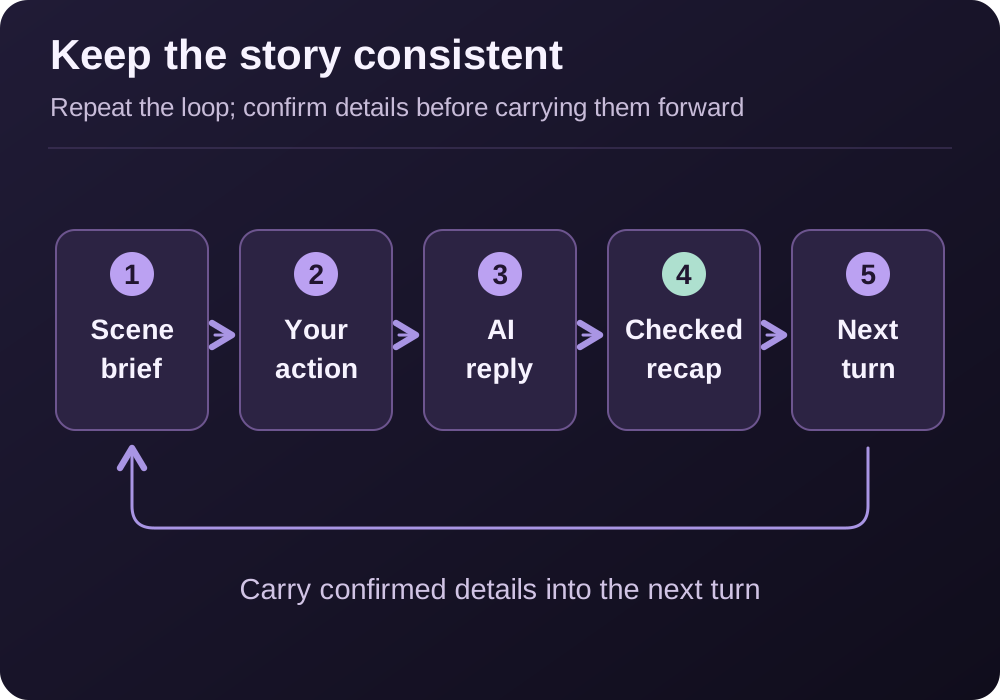
Keep the next choice open, then save only the facts the scene actually established.
Carry the story into another session
Treat your saved summary as a handoff rather than a request to recreate every previous message. Keep character facts separate from the latest scene so you can update one without rewriting the other.
Save the last valid moment
Record the location, current goal, object ownership and unresolved decision. Remove any detail introduced by a reply you rejected.
Provide the context again
Add the character brief, checked ledger and final exchange wherever the app accepts context. State whether you want to resume or start a new scene.
Check before advancing
Ask for a brief restatement of the current situation. Correct any contradiction, then request the next character turn.
For the lighthouse example, a handoff could end: “Eli chose to compare the old chart. The damaged map is on the worktable; the old chart has not been retrieved yet. Resume with Mara fetching it for comparison; do not reveal the source of the signal yet.” This gives the next reply a task while preserving the mystery. Keep a separate copy of your notes if you want to reuse the setup elsewhere.
Repair drift without restarting everything
Pause the fiction with a brief instruction that identifies the specific error and the last valid moment. For example, if a reply takes the map before Eli offers it:
Out of character: Eli has not handed over the map.
Rewind to Mara asking to see it. Rewrite only your last turn.
Keep Mara uncertain about the signal and leave Eli's choice open.
If dialogue repeats, change the immediate task: ask the character to inspect an object, make a difficult choice or explain conflicting evidence. If the AI resolves every obstacle instantly, restate what the character cannot know. Save the corrected checkpoint before moving on.
| Problem in the reply | Targeted repair to try |
|---|---|
| The AI narrates your agreement | “Rewrite that turn. Ask Eli to agree, then wait for my decision.” |
| The character knows an undiscovered answer | “Mara has a theory, not proof. Rephrase the explanation as a suspicion and give one observable clue.” |
| A character repeats the same question | “I already answered where the map came from. React to that answer and examine the ink.” |
| The scene jumps to another location | “We have not left the workroom. Continue here until I choose to move.” |
| Every reply adds another emergency | “Keep the existing signal problem. Develop the current clue without introducing a new threat.” |
| The reply ends the entire story | “Resolve only this exchange. Leave the island question open for the next scene.” |
Change one instruction at a time so you can see whether it helps. Repeatedly regenerating without identifying the problem can produce different wording with the same mistake. If the scene still stalls, save the useful material and simplify the premise to one character, one place and one question.
FAQ: AI chatbot roleplay
What should an AI roleplay prompt include?
Include the characters, the current situation, one immediate goal, relevant limits and who controls each role. Add a reply length if you want a quick conversation instead of long narration.
How do I stop the AI from speaking for me?
Explicitly reserve your character's actions, dialogue and thoughts for yourself. When the AI crosses that boundary, ask it to rewrite the last turn from the other character's perspective.
Will a chatbot remember my entire story?
Do not assume it will. Keep a checked summary of established facts, unresolved questions and the current scene so you can restore context when necessary.
Should I use character chat or a story adventure?
Choose character chat when dialogue is the main activity. Try a story adventure when you want exploration and a narrator handling the surrounding world. Run the same short scene in each format before committing to a longer story.