Updated April 2026 — Based on hands-on testing of both platforms
Hotpot AI is the Swiss army knife of AI creative tools. Background removal, image generation, photo restoration, AI art, headshot creation, object removal, colorization — the feature list goes on. It looks impressive at first glance. You land on the site, see two dozen tools laid out in a grid, and think you've found the one platform that does everything.
Then you actually try to build something with it.
You generate an image. It's fine — decent quality, generic output. You generate another one. The character looks completely different. You want to create a video. There's no video generation. You want to apply your character's face consistently across content. There's no character edit. You want your character to speak. There's no lip sync. You want to build a recognizable AI persona that works across Instagram, TikTok, and YouTube. There's no system for that.
Hotpot AI is a collection of utilities. It's useful for one-off editing tasks — removing a background here, restoring an old photo there. But it was never designed for content creators who need to produce consistent, high-quality images and videos at scale. If you've landed on this page, you've probably already figured that out.
This guide breaks down exactly where Hotpot AI falls short for creators, compares it against the best alternatives, and explains why one platform in particular has become the go-to for people who need more than a grab bag of editing tools.
Hotpot AI Review: What It Actually Does Well
Let's give credit where it's due. Hotpot AI has earned its 24,000+ monthly US searches for a reason. The platform offers a wide range of AI-powered tools that are genuinely useful for quick, one-off tasks:
- Background removal — Upload a photo, get a clean cutout. Works well for product photos and headshots.
- AI image generation — Text-to-image with several style presets. Adequate for social media graphics and casual content.
- Photo restoration — Upscale old, damaged, or low-resolution photos. One of Hotpot's stronger tools.
- AI headshots — Generate professional-looking headshots from reference photos. Popular with job seekers and LinkedIn users.
- Object removal — Erase unwanted elements from photos. Basic but functional.
- Colorization — Add color to black-and-white photos. Niche but well-executed.
For casual users who need occasional image editing, Hotpot AI is perfectly adequate. The interface is clean, the tools are straightforward, and the pricing is accessible. If all you need is a quick background removal or a colorized family photo, Hotpot handles that fine.
The problems start when you try to use it as a content creation platform. Because that's not what it is — and the gap between "useful editing tool" and "creator platform" is enormous.
Why Creators Look Beyond Hotpot AI
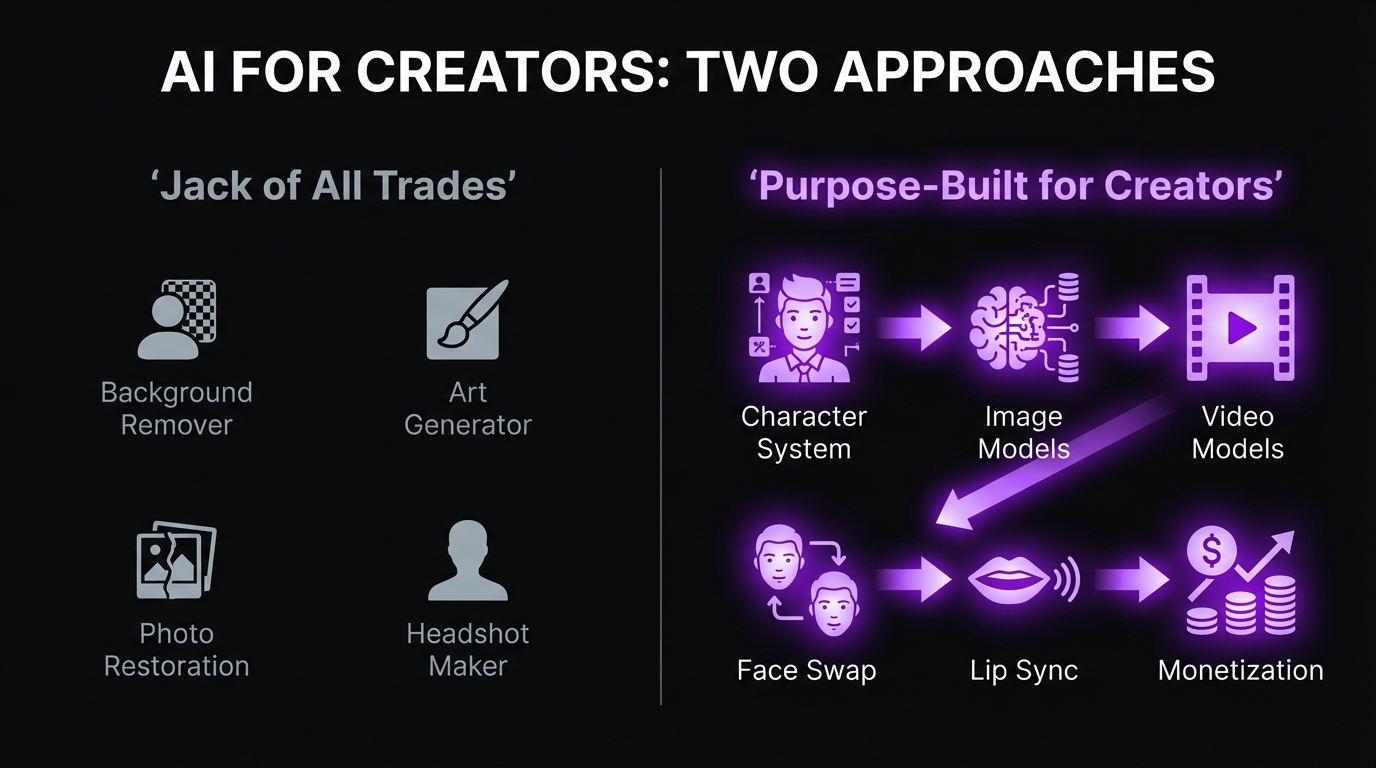
Hotpot AI's jack-of-all-trades approach creates specific problems for anyone trying to produce content at scale. These aren't minor inconveniences — they're fundamental limitations baked into the platform's architecture.
Generic Image Generation
Hotpot AI's image generation is one tool among many on its platform, and it shows. The output is generic — serviceable for blog thumbnails or social media filler, but nowhere near the photorealistic quality that modern AI image models can produce. There's limited model selection, minimal control over generation parameters, and no consistency between outputs.
Compare this to dedicated image generation platforms where you can choose from models like Nano Banana Pro (which produces photorealistic humans that are routinely mistaken for real photography), GPT Image 1 (strong on complex compositions), or Qwen 2.0 Pro Edit (precision editing after generation). Hotpot AI's single, general-purpose generator can't compete with any of these on quality, control, or versatility.
For a detailed breakdown of what's available in modern AI image generation, see our best AI models for image generation guide.
Zero Video Generation
This is the single biggest gap. Hotpot AI has no video generation capability at all. None. In 2026, that's a dealbreaker for content creators.
Video drives 3-5x more engagement than static images on every major social platform. The formats that perform — TikTok clips, YouTube Shorts, Instagram Reels, talking-head commentary — all require video. The AI video generation space has exploded with models like Sora 2, Kling v3.0, and Veo 3.1 producing footage that genuinely competes with professional production.
If your platform can't produce video, your content strategy is operating with a critical piece missing. Hotpot AI gives you edited photos and generated images. The platforms your audience lives on reward video above everything else. The math doesn't work.
For a complete overview of what's possible with AI video in 2026, see our best AI video generators guide.
No Character Consistency
Every image you generate on Hotpot AI is independent. Generate a portrait today and another tomorrow, and you'll get two completely different people — different face shape, different eye color, different proportions, different everything. There's no character system, no face locking, no consistency mechanism of any kind.
This matters because consistency is the foundation of any influencer brand, AI or otherwise. Your audience needs to recognize your character instantly across hundreds of posts. If every image looks like a different person, you can't build a following, you can't build trust, and you can't build a business.
No Character Edit
character edit is the technology that bridges the gap between "generating random AI images" and "building a recognizable AI persona." It lets you take a single character design and apply that exact face to any generated image or video. Same eyes, same bone structure, same expression style — every time, in every piece of content.
Hotpot AI doesn't have it. Each generation starts from zero with no connection to any previous output. You can't build a character that your audience recognizes because the platform has no mechanism for maintaining visual identity across generations.
Learn more about how character edit works in our character edit guide.
No Lip Sync
Lip sync lets your AI character speak with perfectly synchronized mouth movements. Record audio or use text-to-speech, and the AI matches it frame by frame. This single capability unlocks the most valuable content formats for creators: product reviews, brand sponsorship videos, YouTube commentary, TikTok talking-head clips.
Hotpot AI can't do anything close to this. It operates entirely in the static image space. Your characters can't move, can't speak, can't engage an audience the way a talking, moving persona can. In a market where short-form talking-head video is the highest-engagement format on every major platform, that's not a minor limitation — it's a fundamental gap.
See our lip sync guide for the complete workflow.
No Creator Workflow
Perhaps the most telling limitation: Hotpot AI has no workflow designed for content creators. It's a collection of separate tools — generate an image here, remove a background there, restore a photo somewhere else. Each tool operates independently. There's no pipeline that takes you from character design to content production to distribution.
Content creation at scale requires a system: design a character, generate images and videos of that character, maintain consistency, add dialogue, produce content across formats, and distribute to multiple platforms. Hotpot AI was built as a utility belt, not a production line. It's useful for isolated tasks but doesn't connect those tasks into a coherent creator workflow.
What to look for in a Hotpot AI alternative
The best Hotpot AI alternative for creators should: (1) generate photorealistic images with multiple specialized models, (2) produce AI video content, (3) maintain character consistency across all output, (4) support character edit and lip sync for talking-head content, and (5) connect all of these into a unified creator workflow. A collection of disconnected editing tools isn't enough.
The Best Hotpot AI Alternative: MakeInfluencer.ai
MakeInfluencer.ai was built for exactly the kind of creator that Hotpot AI wasn't designed for. Where Hotpot AI spreads itself across two dozen utility tools, MakeInfluencer.ai focuses on one thing: giving creators everything they need to build, produce, and monetize AI-generated content.
The difference is depth versus breadth. Hotpot AI touches many categories lightly. MakeInfluencer.ai goes deep on the capabilities that actually matter for content production.
10+ AI Image Models (Not Just One Generic Generator)
Hotpot AI gives you a single image generation pipeline with limited style options. MakeInfluencer.ai gives you access to over 10 specialized image generation models, each optimized for different content types:
| Model | Best For | Output Quality |
|---|---|---|
| Nano Banana Pro | Photorealistic portraits, lifestyle shots | Exceptional — routinely mistaken for real photography |
| GPT Image 1 | Complex scenes, creative compositions | Excellent — strong on multi-element scenes |
| Qwen 2.0 Pro Edit | Post-generation editing (outfits, backgrounds, poses) | Excellent — precision refinement |
| Seedream | Fast iteration, diverse styles | Very Good — rapid content testing |
The quality gap between Hotpot AI's generic output and Nano Banana Pro's photorealistic generation is immediately visible. Hotpot produces images that look like AI art. Nano Banana Pro produces images that look like photography. For creators building a brand around a character, that difference determines whether your audience perceives your content as amateur or professional.
10+ AI Video Models
This is where the comparison becomes asymmetric. Hotpot AI has zero video capability. MakeInfluencer.ai gives you access to over 10 state-of-the-art video generation models:
| Model | Best For | Speed | Quality |
|---|---|---|---|
| Sora 2 | Cinematic brand videos, narrative content | Moderate | Exceptional |
| Kling v3.0 | Fast social clips, motion realism | Fast | Excellent |
| Veo 3.1 | Videos with built-in audio and dialogue | Moderate | Excellent |
| Runway Gen-3 | Style transfer, creative effects | Moderate | Very Good |
| WAN 2.1 | Fast | Very Good | |
| Seedance 2.0 | Dance and choreography content | Fast | Very Good |
Quick 15-second clip for TikTok? Kling v3.0 generates in under a minute. Cinematic brand video for YouTube? Sora 2 produces footage that looks like it came from a professional shoot. Video with native dialogue and sound effects? Veo 3.1 generates audio built into the clip. You choose the right model for each piece of content.
Character Edit for Character Consistency
This is what transforms isolated AI generations into a coherent brand. character edit lets you take your character's face and apply it to any generated video. The result: your AI persona looks identical in every single piece of content — same eyes, same bone structure, same expression style — regardless of which model generated the base video or what prompt you used.
Generate a video with Sora 2. Apply character edit. Generate another video with Kling v3.0. Apply character edit. Both videos feature the exact same character. Your audience sees a consistent person across every post, every platform, every content format. That's how real influencer brands work — and Hotpot AI has no mechanism for it.
Read the full breakdown in our character edit guide.
Lip Sync for Talking Content
Record or generate audio, and lip sync matches it to your character's face with natural mouth movement. The lip movements track phonemes — not just generic jaw motion — so the result looks convincing even on close-up shots. MakeInfluencer.ai supports lip sync clips up to 10 minutes, long enough for full YouTube videos.
This opens up the content formats that generate the most revenue and engagement:
- Product review videos — Your character holds and discusses products with natural speech
- Brand sponsorship content — Deliver scripted brand messages in your character's voice
- YouTube commentary and narration — Full talking-head videos without ever appearing on camera yourself
- TikTok talking-head clips — The single highest-engagement format on the platform
- Educational and how-to content — Build authority in a niche through instructional videos
Hotpot AI can remove a background from a photo. MakeInfluencer.ai can make your AI character deliver a five-minute product review with perfectly synced lip movements. These are not in the same category.
See our lip sync guide for the complete setup.
Motion Control
Direct your character's movement and camera angles like you're on a real film set. Motion Control uses trajectory-based controls that let you specify where a character walks, where the camera pans, how the scene unfolds, and what gestures the character makes.
This is the difference between AI video that looks like it was randomly generated and video that looks like it was intentionally directed. Smooth tracking shots, dramatic reveals, choreographed movement sequences — the kind of production quality that used to require a camera crew and a director.
Head-to-Head: Hotpot AI vs MakeInfluencer.ai
Here's the complete feature comparison across every capability that matters for content creation:
To be clear about what Hotpot AI does better: if you need a quick background removal, a photo restoration, or a colorized image with zero setup, Hotpot AI's utility-first approach gets you there fast. These are legitimate use cases, and Hotpot AI handles them competently.
But the moment your needs extend beyond one-off editing tasks — the moment you need to create consistent characters, generate video, produce talking-head content, or build a content pipeline — the comparison breaks down entirely. These aren't features Hotpot AI does worse. They're features Hotpot AI doesn't have.
Image Quality: Generic AI Art vs Photorealistic Character Creation
This deserves a dedicated section because image quality is where many creators first notice the gap between Hotpot AI and specialized platforms.
Hotpot AI's Output
Hotpot AI generates images that look like... AI art. They have that characteristic smoothness, the slightly plastic skin texture, the generic composition that signals "this was made by an AI." For blog thumbnails, social media graphics, or casual use, this is perfectly fine. The images are clean and usable.
But they don't look like photographs of real people. They don't have the skin texture detail, the lighting nuance, the subtle imperfections that make a generated face look genuinely human. And critically, they're inconsistent — generate two images of what's supposed to be the same person, and you'll get two visibly different people.
MakeInfluencer.ai's Output with Nano Banana Pro
Nano Banana Pro, MakeInfluencer.ai's flagship photorealistic model, produces a fundamentally different kind of output. The skin texture has pores. The lighting has depth. The eyes have realistic reflections. The overall effect is that these images look like they were taken with a camera, not generated by a neural network.
This isn't just an aesthetic preference — it directly affects how your audience perceives your content. AI-looking images get scrolled past. Photorealistic images stop the scroll. On platforms like Instagram and TikTok, where first impressions happen in fractions of a second, the quality of your visual output determines whether people engage or keep moving.
And because MakeInfluencer.ai includes character edit, that photorealistic quality extends to video. Your character looks the same — and looks real — in every format, on every platform.
The Editing Advantage
Where Hotpot AI's editing is about fixing photos (removing backgrounds, restoring old images, erasing objects), MakeInfluencer.ai's editing is about refining generated content. Using Qwen 2.0 Pro Edit, you can take a generated image and adjust specific elements — change the outfit, swap the background, modify the pose — without regenerating the entire image. It's creative editing in service of content production, not utility editing in service of photo cleanup.
Other Hotpot AI Alternatives Worth Considering
MakeInfluencer.ai is the strongest option for content creators, but if your needs are different, here's how other alternatives compare:
Canva AI
Best for: Teams and businesses that need branded design templates with AI assist.
Canva has integrated AI tools into its design platform — background removal, AI image generation, text-to-image, and various editing features. If your workflow centers on presentations, social media graphics, and branded templates, Canva AI is polished and well-integrated. The Magic Studio suite offers many of the same utility features as Hotpot AI but within a more professional design environment.
What it lacks: No video generation beyond basic slideshow-style output. No character edit. No lip sync. No character consistency. No . Canva is a design tool, not a content creation platform for AI influencers. It's a better Hotpot AI for corporate and marketing use, but it doesn't solve any of the creator-specific gaps.
Leonardo AI
Best for: Artists and designers who want precise control over AI image generation.
Leonardo AI offers more sophisticated image generation than Hotpot AI, with model fine-tuning, style control, and higher-quality output. The trained model system lets you create custom models based on your own reference images, which gets closer to character consistency than Hotpot AI's one-off generations.
What it lacks: Limited video generation (basic image-to-video only). No character edit. No lip sync. No integrated creator workflow. Leonardo is a powerful image generation tool — significantly better than Hotpot AI for that specific use case — but it's still focused on images, not the full content pipeline creators need.
Playground AI
Best for: Casual users who want free AI image generation with a social community.
Playground AI provides a generous free tier for AI image generation with a community gallery. The interface is approachable, and the quality is decent for casual use. If your main complaint about Hotpot AI is pricing and you primarily need basic image generation, Playground is worth trying.
What it lacks: No video generation. No character edit. No lip sync. No character system. Limited model selection. The free tier is appealing, but the feature set is even more limited than Hotpot AI for creator workflows. It's a free alternative to one piece of what Hotpot offers, not a comprehensive upgrade.
Midjourney
Best for: Artists who want the highest-quality AI art with strong aesthetic control.
Midjourney produces arguably the most visually striking AI images available. The aesthetic quality, composition, and artistic style are a genuine step above what Hotpot AI or most other platforms generate. If your content leans heavily toward artistic, stylized imagery rather than photorealism, Midjourney is the quality leader.
What it lacks: No video generation. No character edit. No lip sync. Character consistency is improving but still imperfect. No integrated creator workflow. Midjourney is an exceptional image generation tool, but it's an image generation tool — not a content creation platform. And its output tends toward artistic and stylized rather than the photorealism that AI influencer content requires.
How to choose based on your actual needs
If you need better design templates for business use, try Canva AI. If you want the highest-quality artistic AI images, try Midjourney. If you want precise control over image generation with custom models, try Leonardo AI. If you want to build an AI influencer brand with consistent characters, video, character edit, lip sync, and a full content pipeline, MakeInfluencer.ai is the only option that covers the entire stack.
What You Can Actually Build After Switching
To make this concrete, here's what a typical creator workflow looks like once you move from Hotpot AI's utility tools to a dedicated content creation platform:
Design Your AI Character
Define your character's appearance, body type, ethnicity, hair, facial features, clothing style, personality, and voice. This becomes the consistent identity that appears across every platform — the face your audience recognizes.
Build Your Image Library
Generate 50-100 images using Nano Banana Pro for photorealistic portraits and lifestyle shots. Cover different settings, outfits, and scenarios to create a backlog before you start posting.
Create Video Content
Generate short-form video clips using Kling v3.0 for speed or Sora 2 for cinematic quality. Apply character edit to every video so your character looks identical in every clip.
Add Talking-Head Content with Lip Sync
Record or generate audio and apply lip sync to create product reviews, commentary videos, and brand deal content. This is the format that drives the highest engagement and unlocks monetization.
Distribute Across Platforms
Post consistently across Instagram, TikTok, YouTube, Twitter/X, and subscription platforms like creator platforms or creator platforms. Use the content pipeline to maintain 5-7 posts per day across channels.
Monetize and Scale
Build revenue through subscriptions, tips, brand deals, and ad revenue. Scale by increasing content volume, experimenting with longer formats, and expanding to additional platforms.
That entire pipeline — from character design to monetization — runs through one platform. With Hotpot AI, you'd remove a background, generate a generic image, maybe restore an old photo. Useful tasks, but disconnected from any larger creative strategy.
A Realistic Creator Timeline
Here's what the first three months typically look like for creators who make the switch:
Weeks 1-2: Foundation. Design your character with full customization. Generate 80+ images covering different settings — indoor, outdoor, casual, editorial, travel, fitness. This becomes your content backlog for Instagram and Twitter. Use multiple image models to find the style that fits your brand.
Weeks 3-4: Video Launch. Start generating video content using Kling v3.0 (fastest turnaround) and Sora 2 (highest cinematic quality). Apply character edit to every video. Begin posting to TikTok and YouTube Shorts while maintaining your image posting schedule on Instagram.
Month 2: Talking Content. Add lip sync to your workflow. Create product reviews, commentary videos, "day in the life" talking-head clips. This is the content that brands want to sponsor and audiences want to subscribe to. Start reaching out to brands for sponsorship opportunities. Set up a subscription page on creator platforms or creator platforms for premium content.
Month 3+: Scale. Ramp to daily posting across all platforms. Add Motion Control for choreographed, cinematic content. Diversify into longer YouTube videos. Layer in multiple revenue streams — subscriptions, tips, brand deals, ad revenue. Creators at this stage report earning $1,000-$15,000/month depending on niche and consistency.
With Hotpot AI, after three months you'd still have a collection of one-off edited images with no consistent character, no video content, and no path to revenue.
For a detailed breakdown of how AI influencer monetization works, see our monetization guide.
Pricing: Utility Tools vs Creator Platform
Hotpot AI Pricing
Hotpot AI uses a credit-based system. You purchase credits and spend them across the various tools — image generation, background removal, restoration, and so on. The per-tool pricing is accessible, and there's a limited free tier for testing. For occasional editing tasks, it's reasonably priced.
The question isn't whether Hotpot AI is expensive. It's what you get for your money. Credits buy you one-off editing operations — a background removal here, a generated image there. There's no cumulative value. Each credit buys a single, disconnected output.
MakeInfluencer.ai Pricing
MakeInfluencer.ai also uses a credit-based system, but the credits access a fundamentally different set of capabilities:
| Plan | What It Includes |
|---|---|
| Free Tier | Test the platform — generate first images and short videos, explore the dashboard |
| Starter | Base credits for initial content production — images, short videos, character edit |
| Pro | Higher credit allocation for consistent daily production across all models and tools |
| Scale | Maximum credits for multiple AI influencer accounts or high-volume production |
The key difference is return on investment. Hotpot AI credits buy you utility — edited photos that serve a one-time purpose. MakeInfluencer.ai credits buy you content that can generate revenue. A single video with character edit and lip sync can be posted to TikTok, YouTube Shorts, and Instagram Reels — reaching audiences across platforms and driving subscriptions, brand deals, and ad revenue.
Dollar for dollar, a credit spent on MakeInfluencer.ai has a path to generating money back. A credit spent on Hotpot AI buys you a removed background.
The real cost comparison
A Pro plan on MakeInfluencer.ai produces enough content to maintain daily posting across multiple platforms — the kind of consistency that builds audiences and attracts brand deals. Hotpot AI at the same price point gives you a stack of disconnected editing operations. The monthly cost might be similar; the revenue potential isn't even in the same conversation.
Making the Switch from Hotpot AI
If you're currently using Hotpot AI for content creation and want to upgrade to a purpose-built platform, the transition is straightforward:
- Sign up at MakeInfluencer.ai — a free tier lets you test every major feature before committing
- Design your character using the full character creator — you'll have customization options that Hotpot AI simply doesn't offer, including detailed control over facial features, body type, clothing, personality, and voice
- Generate your first images with Nano Banana Pro — you'll immediately see the quality difference versus Hotpot AI's generic output
- Create your first video using Kling v3.0 — this is usually the moment that makes the gap obvious, since Hotpot AI has no video capability at all
- Apply character edit to lock in your character's look — watch the same face appear consistently across different videos and settings
- Try lip sync — record a 30-second audio clip and watch your character speak it naturally. For Hotpot AI users, this is typically the "there's no going back" moment
For a detailed walkthrough of the full setup process, see our getting started guide.
Most creators who switch describe the same experience: Hotpot AI felt sufficient because they didn't know what else was possible. Once you've generated a photorealistic character, watched that character move in a video, and heard that character speak with synced lip movements, the gap between a utility tool and a creator platform becomes impossible to unsee.
When Hotpot AI Is Still the Right Choice
To be fair, there are use cases where Hotpot AI is genuinely the better tool:
- Quick background removal — If you just need to cut out a subject from a photo once or twice, Hotpot AI's dedicated tool is fast and simple.
- Photo restoration — Repairing old, damaged, or low-resolution photos is a genuine Hotpot AI strength. If this is your primary need, Hotpot handles it well.
- Colorization — Adding color to black-and-white photos is a niche feature that Hotpot AI executes competently.
- One-off editing tasks — If you need a single image edited and have no interest in creating ongoing content, Hotpot AI's utility approach is efficient.
The distinction is between users and creators. If you're a user who needs an occasional AI editing tool, Hotpot AI is fine. If you're a creator who needs to produce content consistently, build a recognizable character, and generate revenue from your output, you've outgrown what Hotpot AI was designed to do.
Frequently Asked Questions
Is MakeInfluencer.ai harder to use than Hotpot AI?
Not meaningfully. Hotpot AI is simpler because each tool does one thing — upload, process, download. MakeInfluencer.ai has more features, but the interface is designed for creators, not engineers. If you can navigate Hotpot AI's tool grid, you can navigate MakeInfluencer.ai's dashboard. The learning curve is about understanding what's possible, not fighting the interface. Our getting started guide covers everything step by step.
Can MakeInfluencer.ai do background removal and photo editing?
Yes. MakeInfluencer.ai's image editing models (including Qwen 2.0 Pro Edit) can handle background changes, object removal, and other editing tasks. But more importantly, these edits happen within a character-consistent system — you're editing content that features your established character, maintaining visual identity across every modification. It's editing in service of content creation, not editing as an isolated task.
What if I only need image generation, not video?
MakeInfluencer.ai's image generation alone is a significant upgrade over Hotpot AI. With 10+ specialized models versus Hotpot's single generic generator, you get better quality, more control, more styles, and — critically — character consistency across all your images. Even without touching video, the image generation capabilities justify the switch for most creators. But most users who start with images discover they want video within weeks.
Which video model should I start with?
Kling v3.0 is the best starting point — it's fast, cost-effective, and produces excellent motion quality. Once you're comfortable with the workflow, try Sora 2 for cinematic content (longer generation time, higher quality ceiling) or Veo 3.1 for clips with built-in dialogue and sound effects. Each model has different strengths, so you'll likely use several depending on the content format.
Does MakeInfluencer.ai support ?
How does character consistency actually work?
You design your character once using MakeInfluencer.ai's character creator. Then, when generating images or videos, you use character edit to apply your character's exact face to any output. The result is a character that looks identical across every piece of content — same facial structure, same eyes, same proportions. It's the same principle that makes real influencers recognizable: visual consistency over time.
Can I use Hotpot AI and MakeInfluencer.ai together?
Technically, yes. Some creators use Hotpot AI for specific utility tasks (like restoring a reference photo) and MakeInfluencer.ai for all content creation. But most find that MakeInfluencer.ai's editing capabilities cover everything they were using Hotpot AI for, making the separate tool unnecessary.
Is AI influencer content actually profitable in 2026?
Yes. The AI influencer market has matured significantly. Creators earn through multiple revenue streams — creator platforms and creator platforms subscriptions, YouTube ad revenue, TikTok creator fund, brand sponsorships, and direct tips. Earnings range from a few hundred to $15,000+ per month depending on niche, consistency, and platform mix. The key is consistent, high-quality content featuring a recognizable character — exactly what MakeInfluencer.ai is built to produce. See our complete monetization guide for detailed breakdowns.
How long does it take to generate content?
Image generation with most models takes 10-30 seconds. Video generation varies by model: Kling v3.0 produces a 5-second clip in under a minute, while Sora 2 takes a few minutes for higher-quality output. character edit and lip sync each add a processing step. The full pipeline from prompt to finished, character-editped video with lip sync typically takes 3-7 minutes. Compared to Hotpot AI's per-tool processing times, the total workflow is comparable on a per-asset basis — but the output is vastly more valuable.
What platforms can I post the content to?
Any platform. The content you generate on MakeInfluencer.ai is yours. Creators commonly distribute to Instagram, TikTok, YouTube, Twitter/X, creator platforms, Reddit, and personal websites. There are no distribution restrictions — unlike Hotpot AI's edited outputs (which are limited by the source material), MakeInfluencer.ai's original generated content can be posted and monetized anywhere.
Is there a free tier to test before committing?
Yes. MakeInfluencer.ai offers a free tier that gives you enough credits to generate your first images and short videos. You can test image quality, try character edit, explore the video models, and evaluate whether the platform fits your workflow — all before paying anything. Given that Hotpot AI also offers limited free usage, you can directly compare the output quality side by side at zero cost.