OpenAI's Sora 2 generates high-quality videos with automatically synced audio from text prompts. Available on MakeInfluencer.ai, the model excels at creating realistic and imaginative scenes with natural motion, physics simulation, and cinematic composition.
This guide teaches you the prompting techniques that separate average Sora 2 output from genuinely cinematic results. Whether you are creating content for social media, brand storytelling, or artistic expression, mastering these prompt structures will dramatically improve your video quality.
Content Restrictions
Before diving into prompting techniques, understand what Sora 2 can and cannot generate. These restrictions are enforced by OpenAI and cannot be bypassed.
Sora 2 Content Policy
Sora 2 will reject prompts containing nudity or sexually explicit content, copyrighted characters (Disney, Marvel, anime characters), copyrighted music or recognizable songs, real people or public figures, and human faces in input images. Violations cause generation failures with no credit refund.
What Sora 2 Excels At
Original Creative Content
Unique characters and scenes created from scratch without reference to copyrighted material.
Physics Simulation
Realistic water, fire, wind, gravity, fabric motion, and object interactions rendered naturally.
Cinematic Storytelling
Narrative-driven scenes with clear story arcs, emotional beats, and professional composition.
Automatic Audio
Synchronized sound effects, ambient audio, dialogue, and musical elements generated with each video.
Style Versatility
Photorealistic, watercolor, oil painting, digital art, vintage film, and dozens of other visual styles.
Abstract Concepts
Surreal, artistic, and conceptual imagery that would be impossible or prohibitively expensive to film.
For AI video generation, use or WAN 2.6 Flash instead. For the highest visual fidelity, consider Veo 3. For cost-effective everyday content, Kling v3.0 offers better value.
Prompt Anatomy: The Six Elements
A well-crafted Sora 2 prompt includes six key elements. Including all six consistently produces the best results.
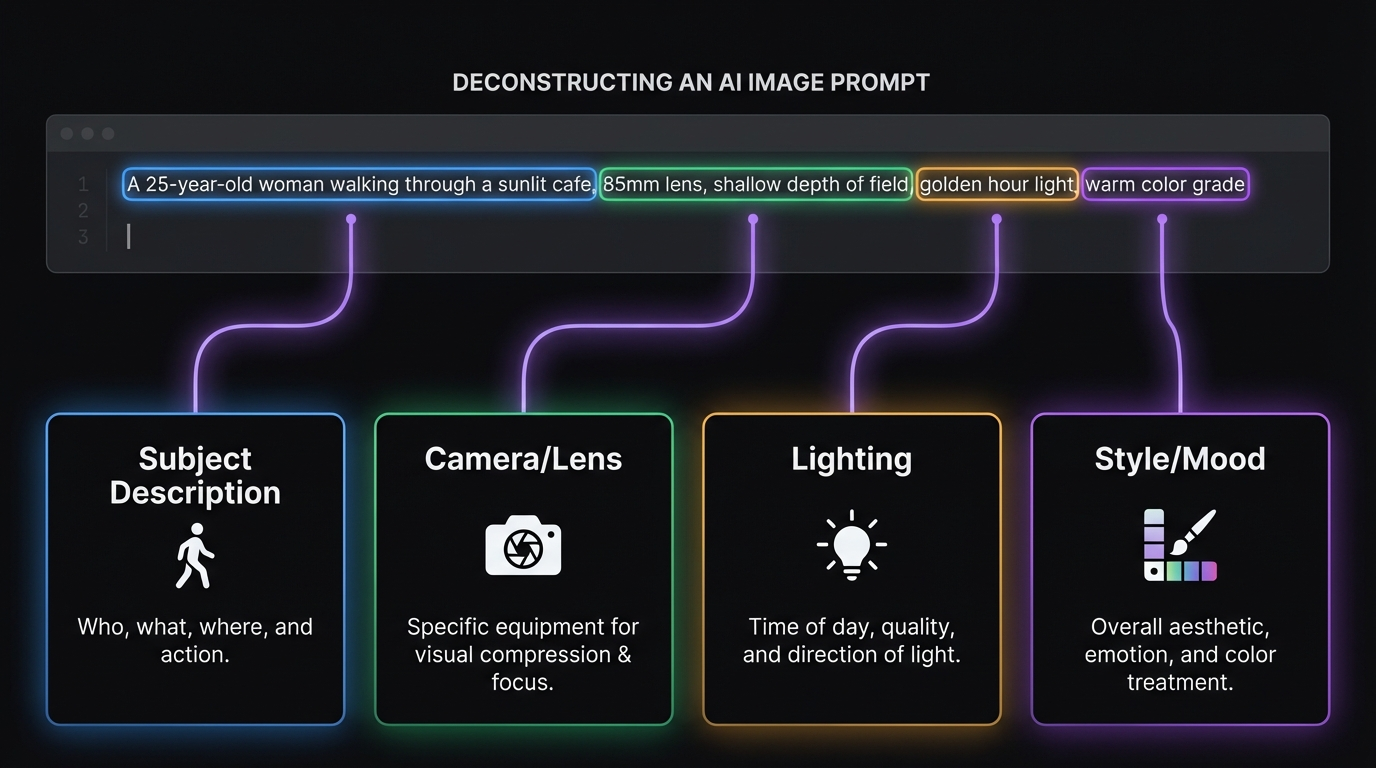
1. Subject -- Who or What Is the Focus
Define the main character or object in the scene. Be specific about appearance, clothing, posture, and demeanor. Avoid referencing real people or copyrighted characters.
2. Setting -- Where the Scene Takes Place
Describe the environment, location, and spatial context. Include details like architecture, landscape, weather, and time of day.
3. Action -- What Is Happening
Describe the specific movements, gestures, and events occurring in the scene. Motion descriptions are critical for compelling video.
4. Style -- Visual Aesthetic and Mood
Specify the visual treatment: cinematic, watercolor, vintage film, anime-inspired, documentary, or any other aesthetic direction.
5. Camera Work -- Movement and Framing
Direct the virtual camera with specific cinematographic instructions: tracking shots, dolly zooms, aerial views, close-ups, and transitions.
6. Audio -- Sounds, Music, and Atmosphere
Describe the soundtrack: ambient sounds, musical genre, specific sound effects, and atmospheric tone. Sora 2 generates audio automatically based on these descriptions.
Basic vs Detailed Prompts
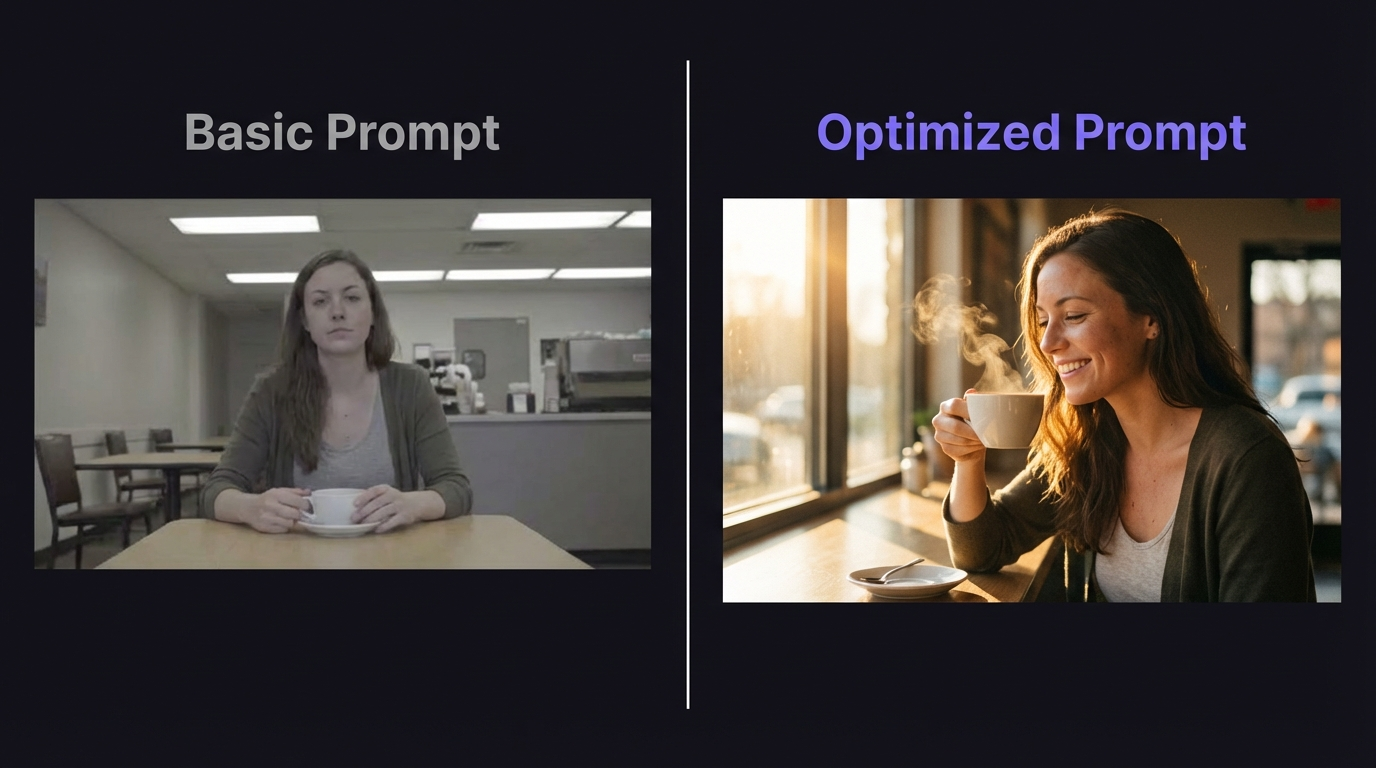
Basic: A robot walks through a city
Detailed: A sleek silver robot with glowing blue eyes walks confidently through a futuristic neon-lit city at night. Rain reflects the colorful lights on wet pavement as the robot's footsteps echo through empty streets. The camera tracks alongside at eye level. Ambient electronic music with distant city sounds and rhythmic footsteps.
The detailed version tells Sora 2 exactly what to render for every element, resulting in far more predictable and higher-quality output.
Audio Prompting
Sora 2 automatically generates synchronized audio with every video. Learning to direct the audio through your prompt is just as important as directing the visuals.
Sora 2 generates four types of audio:
- Dialogue and speech: Natural conversation and narration
- Sound effects: Environmental and action sounds
- Ambient audio: Background atmosphere and mood
- Musical elements: Instrumental background music
Audio Prompt Examples
Soft piano music with gentle rain sounds
Epic orchestral score with dramatic crescendo
Bustling cafe ambiance with coffee machine sounds and quiet chatter
Ocean waves crashing with seagull calls and wind through grass
Audio Specificity Matters
Vague audio prompts like "background music" produce generic results. Specific prompts like "melancholy cello solo with distant thunder" give Sora 2 clear direction for generating compelling soundscapes.
Professional Prompt Examples
Cinematic Scenes
Epic Landscape:
A majestic dragon soars over a vast mountain range at golden hour,
its wings casting shadows on the peaks below. The camera follows in
a sweeping aerial shot as the dragon glides through wispy clouds.
Epic orchestral music with wind sounds and distant thunder.
Urban Adventure:
A parkour athlete leaps between rooftops in a cyberpunk city,
neon lights reflecting off rain-soaked surfaces. The camera tracks
the fluid movements as they navigate obstacles with precision.
Electronic music with urban ambiance and distant traffic.
Character-Driven Stories
Emotional Moment:
An elderly craftsman carefully carves intricate details into a
wooden sculpture in his workshop. Warm sunlight streams through
dusty windows as wood shavings fall to the floor. Gentle acoustic
guitar with workshop ambiance and distant birds.
Adventure Scene:
A young explorer discovers a hidden cave filled with glowing
crystals. Their flashlight beam reveals ancient symbols on the
walls as they move deeper into the cavern. Mysterious ambient
music with echoing footsteps and dripping water.
Abstract and Artistic
Surreal Concept:
Floating islands drift through a pastel sky filled with giant
soap bubbles. Each island has its own miniature ecosystem with
tiny waterfalls cascading into the clouds below. Dreamy ambient
music with gentle wind chimes and flowing water.
Artistic Style:
In the style of a watercolor painting: A field of wildflowers
sways in the breeze as butterflies dance between the blooms.
The scene has soft, flowing brushstrokes and vibrant colors
that blend naturally. Peaceful classical music with nature sounds.
Camera Techniques
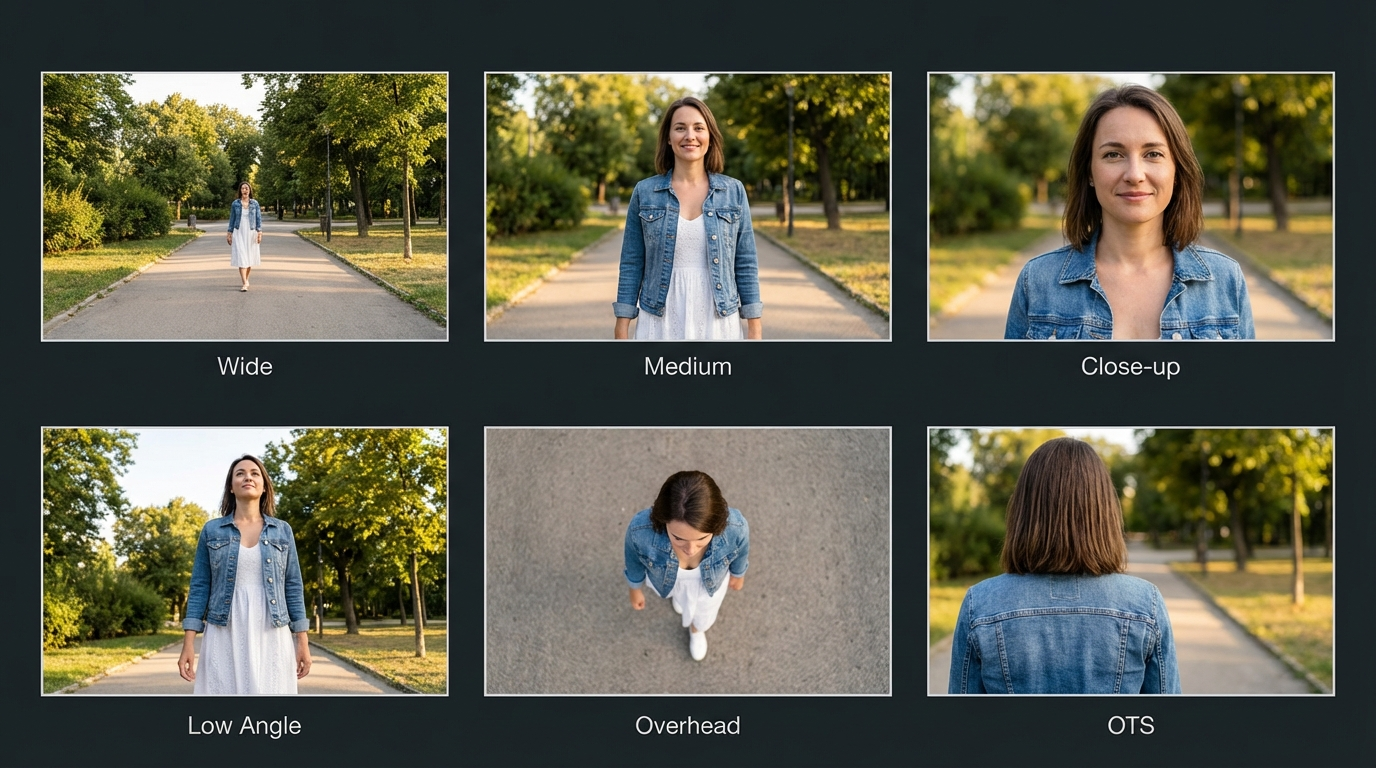
Camera direction is one of the most impactful elements in your prompt. Sora 2 understands and executes standard cinematographic terminology.
Movement Types
Tracking Shot:
The camera smoothly tracks alongside a vintage car driving down
a winding coastal road at sunset, keeping pace with the vehicle
as ocean waves crash against the cliffs below.
Dolly Zoom:
A dramatic dolly zoom focuses on a lighthouse keeper as storm
clouds gather, the background stretching while the subject
remains in sharp focus, creating a sense of impending drama.
Aerial View:
An aerial drone shot spirals around a medieval castle on a
hilltop, revealing the surrounding countryside and distant
mountains as the camera slowly pulls back to show the full landscape.
Framing Techniques
Use these framing terms in your prompts for precise control:
- Close-up: Focus on details and emotions (faces, hands, objects)
- Wide shot: Establish setting and scale (landscapes, architecture)
- Medium shot: Balance character and environment (waist-up view)
- Bird's eye view: Show patterns and spatial relationships from above
- Low angle: Create drama, power, and imposing presence
- High angle: Show vulnerability or provide an overview perspective
Style Variations
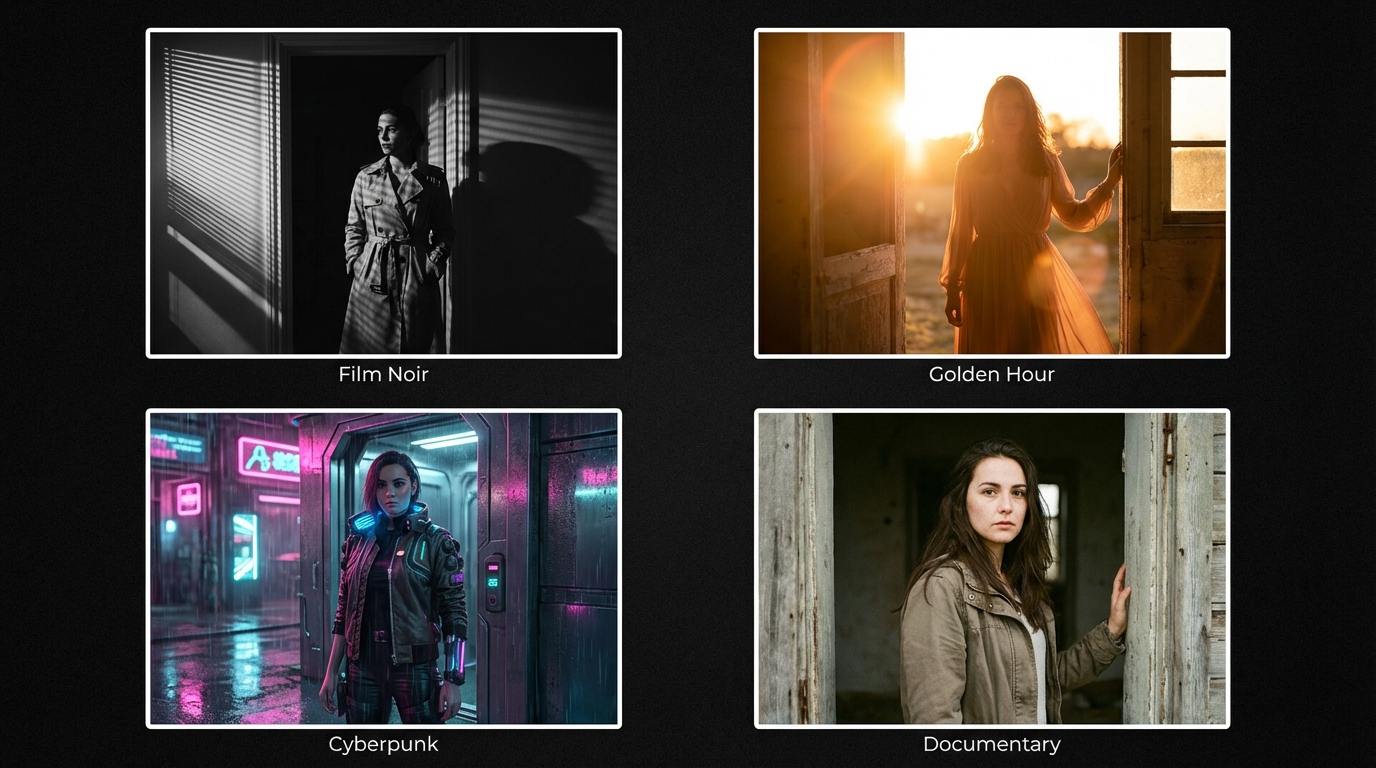
Sora 2 supports a wide range of visual styles. Prefix your prompt with a style declaration for consistent aesthetic treatment.
Artistic Styles
- Watercolor: "In the style of a watercolor painting..." -- soft, flowing brushstrokes with bleeding colors
- Oil painting: Rich textures with visible brush marks and deep color saturation
- Pencil sketch: Detailed line work with shading and cross-hatching
- Digital art: Clean, precise rendering with vibrant colors
- Vintage film: Grainy texture with warm color grading and film grain
Genre Styles
- Sci-fi: Futuristic technology, alien landscapes, advanced civilizations
- Fantasy: Magical elements, mythical creatures, enchanted environments
- Horror: Dark atmosphere, suspenseful elements, dramatic shadows
- Romance: Soft lighting, intimate moments, warm color palettes
- Adventure: Dynamic action, exploration, sweeping vistas
Physics and Motion
Sora 2 excels at realistic physics simulations. Describing physical interactions in detail produces the most compelling results.
Natural Elements
Water cascades down rocky cliffs, creating mist that catches rainbow light
Fire dances and flickers, casting warm shadows on surrounding objects
Wind moves through tall grass, creating waves of green motion
Snow falls gently, accumulating on branches and melting on warm surfaces
Object Interactions
A paper airplane glides through the air, catching updrafts and spiraling down
Marbles roll down a wooden ramp, bouncing and scattering across the floor
Fabric billows and flows in the breeze, revealing its texture and weight
Liquid pours from a pitcher, forming streams and splashing into a glass
Advanced Techniques
Storytelling in a Single Clip
Even within a short video, you can convey a narrative arc.
Character Development:
A young artist struggles with a blank canvas, then inspiration strikes.
Their face lights up as they begin painting with passionate strokes,
colors flowing across the surface as their vision comes to life.
Gentle piano building to an uplifting crescendo.
Narrative Arc:
A seed falls into rich soil, sprouts into a small plant, grows through
seasons of rain and sun, and finally blooms into a magnificent tree
that provides shelter for forest creatures. Time-lapse with nature
sounds transitioning through seasons.
Emotional Resonance
Joy and Wonder:
A child discovers a music box in an attic, winding it up to reveal
a tiny dancing figure. Their eyes widen with delight as the melody
plays and soft golden light fills the dusty room. Delicate music
box melody with ambient attic sounds.
Melancholy and Beauty:
Autumn leaves fall gently around an empty park bench. The golden
light filters through bare branches as the last leaf drifts to the
ground. Soft piano with distant wind and rustling leaves.
Common Mistakes to Avoid
Content Issues
- Using real celebrity names or likenesses (generation will fail)
- Referencing copyrighted characters or brands (Disney, Marvel, etc.)
- Including inappropriate or violent content
- Requesting specific copyrighted music or songs
Technical Issues
- Vague or overly simple prompts that give the AI insufficient direction
- Conflicting physics or impossible scenarios that confuse the model
- Ignoring audio elements in descriptions (missing free production value)
- Not specifying camera work or style (defaulting to generic shots)
- Over-prompting with contradictory instructions
Prompt Iteration Strategy
Start with a detailed prompt for your first generation. If the result is close but not perfect, adjust one element at a time rather than rewriting the entire prompt. This helps you understand which element is causing issues.
Sora 2 vs Other Video Models
For a full comparison of all AI video generators, see the Best AI Video Generators 2026 guide.
Choose Sora 2 for cinematic, creative, and narrative-driven content where built-in audio is a priority. Choose Kling v3.0 for cost-effective, reliable generation and Motion Control workflows. Choose Veo 3 for the highest visual fidelity.
Frequently Asked Questions
Can I use Sora 2 with my AI influencer images?
Sora 2 currently rejects human faces in input images. For animating your AI influencer, use Kling v3.0 Image-to-Video or Motion Control instead. Use Sora 2 for establishing shots, B-roll, and cinematic scenes that complement your influencer content.
Why does Sora 2 cost more than other models?
Sora 2 includes automatically synchronized audio (sound effects, music, ambient sounds) with every generation. Other models charge extra for sound. The cinematic quality and audio generation justify the premium for content where production value matters.
How do I get consistent characters across multiple Sora 2 videos?
Use detailed, consistent character descriptions across all prompts. Include specific physical details like "a woman in her 30s with auburn hair in a messy bun, wearing a cream linen shirt" and repeat those exact descriptions in every prompt.
What is the best duration for social media content?
For TikTok and Reels, generate 4-8 second clips. For YouTube Shorts, 10-20 seconds works well. For B-roll and establishing shots, 4-8 seconds is typically sufficient. Pair Sora 2 cinematic clips with Lip Sync talking head videos for complete content packages.
Can I add my own audio to Sora 2 videos?
Yes. While Sora 2 generates audio automatically, you can mute the generated audio and add your own music, voiceover, or sound effects in any video editor. Many creators use Sora 2 visuals with trending audio tracks for social media.
How does Sora 2 compare to Veo 3 for cinematic content?
Sora 2 excels at creative, artistic compositions with included audio. Veo 3 delivers higher visual fidelity for photorealistic content. Both are excellent for cinematic work. See the Veo 3 Prompting Guide for a detailed comparison.
Start Creating with Sora 2
Sora 2 is a powerful tool for cinematic AI video generation. Success comes from understanding its six prompt elements, respecting its content limitations, and crafting detailed prompts that bring your creative vision to life.
Sign Up for MakeInfluencer.ai
Create your account and choose a plan to start generating Sora 2 videos immediately.
Start with Example Prompts
Copy and modify the example prompts from this guide to learn how each element affects the output.
Master the Six Elements
Practice including subject, setting, action, style, camera work, and audio in every prompt you write.
Build Your Style Library
Save successful prompts and build a personal library of templates for different content types.
Start Creating Cinematic Videos with Sora 2 on MakeInfluencer.ai